
Building an AI Energy Analyst: LangGraph + Databricks Genie for Multi-Domain Market Research

It is the ‘Week of Agents’ at Databricks, and this has inspired me to create a blog around leveraging agents to help dissect and analyze complex energy markets. Like I mentioned in my previous blog post, I’ve been intrigued by energy markets as of late and I am trying to identify ways to keep up to date with what is happening within North America and across the world when it comes to energy markets. The more I dig in, the more I appreciate just how fragmented the information landscape is.
An energy market analyst on any given Wednesday morning is watching the EIA petroleum status report drop, tracking overnight geopolitical developments out of the Middle East, monitoring ERCOT load forecasts ahead of a Texas heat wave, and trying to synthesize all of it into a coherent view across commodities. These signals don’t live in the same place, don’t update on the same cadence, and require genuine domain knowledge to interpret together.
I also wanted to look at this as an opportunity to get more hands-on experience with novel cutting-edge technology like agents. Instead of a trader switching between five tabs and three data providers, what if a single conversational interface could pull from all those sources as they sit in your data lake like live inventory data from the EIA, latest available public data on ERCOT curtailment risk, breaking news with AI-classified sentiment and synthesize a coherent answer on demand?
This post walks through how it was built using LangGraph, Databricks Genie, and Databricks Model Serving.
What Has Been Built
The research agent routes questions to specialised sub-agents, each backed by a Genie space with domain-specific data, and synthesises the results into a single answer.
For a single-domain question (“What’s the WTI price?”), the agent calls one tool. For a cross-domain question (“Give me a full market brief”), it calls all three and synthesises. The routing decision is made by the LLM and it reads the tool descriptions and decides what’s needed.
The Data Foundation
Before there’s an agent, there’s a lakehouse. This project runs 7 Lakeflow Spark Declarative Pipelines on Databricks serverless, ingesting from public energy APIs into Unity Catalog:
| Pipeline | Source | Key tables |
|---|---|---|
commodity_prices_pipeline |
Yahoo Finance (yfinance) |
silver_commodity_ohlcv — WTI, Brent, Henry Hub, RBOB, Heating Oil |
eia_fundamentals_pipeline |
EIA API v2 + DPR Excel | silver_petroleum_inventory, silver_natural_gas_storage, silver_eia_dpr |
ercot_data_pipeline |
ERCOT Public API | silver_ercot_load_hourly, silver_ercot_hub_prices |
ercot_4cp_pipeline |
ERCOT historical XLS (1998–2020) | gold_ercot_4cp_risk_model, gold_ercot_4cp_candidates |
weather_data_pipeline |
Open-Meteo | silver_weather_hdd_cdd — HDD/CDD by ERCOT zone |
news_sentiment_pipeline |
NewsAPI + Databricks AI Functions | silver_news_sentiment — classified events + sentiment scores |
gold_market_insights_pipeline |
Joins across silver tables | gold_crude_fundamentals, gold_ercot_spark_spread |
All pipelines are deployed and scheduled via a Databricks Asset Bundle, with two scheduled jobs running on weekday evenings and Wednesday mornings to keep the data fresh. On top of this lakehouse sit three Genie spaces, each a natural language SQL interface scoped to a specific domain:
- Market Data: prices, EIA inventory/production, ERCOT hub prices and spark spreads
- ERCOT 4CP Analysis: historical peak demand, 2024–2025 curtailment risk model, weather data
- News & Sentiment: rolling ~4-week news window with AI event classification and sentiment scores
Genie handles the SQL generation and execution. The agent’s job is to know which Genie to ask.
Building the Agent
Step 1: Wrap Each Genie as a LangChain Tool
Each tool is a thin wrapper around the Databricks SDK’s Genie Conversation API. We start a conversation, poll until it completes, and extract the text response and SQL result rows.
from databricks.sdk import WorkspaceClient
from langchain_core.tools import tool

GENIE_SPACES = {
    "market_data":    "01f120a563181069924649e4eadfb75e",
    "ercot_4cp":      "01f1227bc4c2113bbb95bcccd6dd634c",
    "news_sentiment": "01f12d623a761d688dd9ab160d273a94",
}

def _query_genie(space_id: str, question: str, timeout: int = 120) -> str:
    w = WorkspaceClient()
    resp = w.genie.start_conversation(space_id=space_id, content=question)

    deadline = time.time() + timeout
    while time.time() < deadline:
        msg = w.genie.get_message(
            space_id=space_id,
            conversation_id=resp.conversation_id,
            message_id=resp.message_id,
        )
        status = msg.status.value if hasattr(msg.status, "value") else str(msg.status)

        if status == "COMPLETED":
            # Extract natural language response + formatted SQL result rows
            parts = []
            for att in msg.attachments or []:
                if hasattr(att, "text") and att.text:
                    parts.append(att.text.content)
                if hasattr(att, "query") and att.query:
                    cols = [c.name for c in att.query.result.statement_response.manifest.schema.columns]
                    rows = att.query.result.statement_response.result.data_array or []
                    parts.append("\n".join([" | ".join(cols)] + [" | ".join(str(v) for v in r) for r in rows[:25]]))
            return "\n\n".join(parts) or "No data returned."

        elif status in ("FAILED", "QUERY_RESULT_EXPIRED"):
            return f"Genie query failed: {status}"

        time.sleep(2)

    return "Genie query timed out."


@tool
def query_market_data(question: str) -> str:
    """Query live commodity prices and EIA supply/demand fundamentals.
    Covers: WTI crude, Brent, Henry Hub, RBOB, heating oil prices;
    US petroleum inventory; natural gas storage; EIA drilling productivity;
    ERCOT hub prices, load actuals, and spark spreads."""
    return _query_genie(GENIE_SPACES["market_data"], question)


@tool
def query_ercot_4cp(question: str) -> str:
    """Query ERCOT 4CP curtailment risk and peak demand data.
    Covers: historical Four Coincident Peaks 1998-2020; 2024-2025 curtailment risk
    model with enhanced_risk_score and curtailment_alert flags; weather (HDD/CDD)
    by ERCOT load zone; projected load thresholds vs actuals."""
    return _query_genie(GENIE_SPACES["ercot_4cp"], question)


@tool
def query_news_sentiment(question: str) -> str:
    """Query recent energy market news with AI sentiment analysis.
    Covers: rolling ~4-week news window; AI-classified event types (supply disruption,
    geopolitical event, weather event, regulatory change, etc.); sentiment labels
    (positive, negative, neutral, mixed); commodity and country tags."""
    return _query_genie(GENIE_SPACES["news_sentiment"], question)
The tool docstrings are really important here, this is how the LLM decides which tool to call. The more precise the description, the better the routing.
Step 2: Wire It Together with LangGraph
With the tools defined, we can wire them together in LangGraph:
from langchain.agents import create_agent
from databricks_langchain import ChatDatabricks

llm = ChatDatabricks(
    endpoint="databricks-meta-llama-3-3-70b-instruct",
    temperature=0,
    max_tokens=4096,
)

agent = create_agent(llm, tools=[query_market_data, query_ercot_4cp, query_news_sentiment],
                     system_prompt=SYSTEM_PROMPT)
create_agent is the LangChain v1 API for building agents, replacing the deprecated langgraph.prebuilt.create_react_agent. It builds a ReAct graph where the LLM reasons about which tool to call, calls it, observes the result, and repeats until it has enough information to answer. ChatDatabricks is provided by the databricks-langchain package and handles authentication and routing to any Databricks Model Serving endpoint.
The system prompt defines the agent’s identity and reinforces the routing logic:
You are an expert energy market research assistant...

Tool routing:
- query_market_data    → prices, EIA supply/demand, ERCOT power prices/load/spark spreads
- query_ercot_4cp      → 4CP peaks, curtailment risk scores, weather, load forecasting
- query_news_sentiment → recent headlines, event classification, sentiment trends

For multi-domain questions, call multiple tools and synthesise the results into a single answer.
Step 3: Deploy to Databricks Model Serving
We wrap the agent in an MLflow PythonModel so it can be deployed as a REST endpoint and queried from the playground, notebooks, or any HTTP client.
class EnergyResearchAgent(mlflow.pyfunc.PythonModel):

    def load_context(self, context):
        _configure_credentials()  # inject DATABRICKS_HOST from env
        self.agent = _build_graph()

    def predict(self, context, model_input, params=None):
        if hasattr(model_input, "to_dict"):
            model_input = model_input.to_dict(orient="records")[0]

        messages = [HumanMessage(content=m["content"])
                    for m in model_input.get("messages", [])
                    if m["role"] == "user"]

        result = self.agent.invoke({"messages": messages})

        return {
            "choices": [{"message": {"role": "assistant",
                                     "content": result["messages"][-1].content},
                         "finish_reason": "stop", "index": 0}],
            "object": "chat.completion",
        }
Logging and registering to Unity Catalog:
mlflow.set_registry_uri("databricks-uc")

with mlflow.start_run():
    mlflow.pyfunc.log_model(
        name="energy_research_agent",
        python_model=EnergyResearchAgent(),
        code_paths=["agents/energy_research_agent/agent.py"],
        pip_requirements=["langgraph>=1.0", "langchain>=1.0",
                          "databricks-langchain", "databricks-sdk>=0.40"],
        registered_model_name="energy_research_agent",
    )
One important detail: the serving container has no default Databricks credentials. The fix is to inject them via secrets when creating the endpoint:
ServedEntityInput(
    entity_name="energy_research_agent",
    entity_version="3",
    workload_size="Small",
    scale_to_zero_enabled=True,
    environment_vars={
        "DATABRICKS_HOST": "https://<your-workspace>.cloud.databricks.com",
        "DATABRICKS_TOKEN": "{{secrets/<your-scope>/databricks_pat}}",
    },
)
Seeing Inside: MLflow Tracing
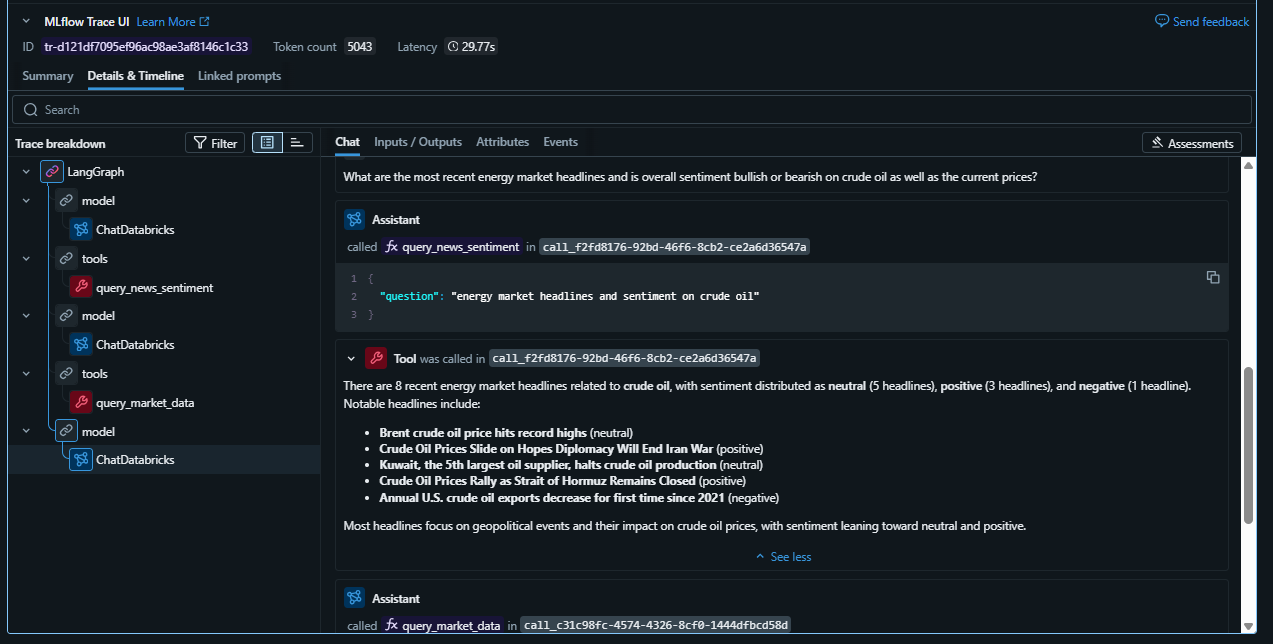
Deploying the agent is one thing. Understanding what it’s actually doing is another. With mlflow.langchain.autolog, every run produces a full execution trace. Tool calls, LLM steps, inputs, outputs, and latency, all viewable in the Experiments UI.
mlflow.langchain.autolog(log_traces=True)

with mlflow.start_run(run_name="full market brief"):
    result = agent.invoke({"messages": [HumanMessage(content=
        "Give me a full energy market brief: WTI price, ERCOT curtailment risk, "
        "and any recent news that could move prices."
    )]})
Opening the trace for the cross-domain question, you can see the full ReAct loop:
- LLM thinks: “This question spans prices, ERCOT risk, and news. I need all three tools.”
- Calls
query_market_data: asks Genie for latest WTI and nat gas prices; gets back SQL results - Calls
query_ercot_4cp: asks Genie for the current risk score and latest curtailment alert - Calls
query_news_sentiment: asks Genie for recent articles and aggregate sentiment on crude - LLM synthesises: writes a coherent market brief grounded in the actual data values
Each step shows the exact question sent to Genie, the SQL it generated, the raw result rows, and how long each step took. For a question that hits all three Genie spaces, total latency is typically 30–60 seconds which is dominated by Genie query time, not LLM reasoning.
Tuning Your Genie Sub-Agents: From Instructions to Certified SQL
I had to do a ton of fine-tuning on the Genie spaces to get the correct responses back.
There are three tiers of guidance you can give a Genie space, in increasing order of reliability:
| Tier | Mechanism | How it works | Reliability |
|---|---|---|---|
| 1 | Instructions | Natural language guidance block | Genie may follow it |
| 2 | Sample questions | Example questions shown in the UI | Steers question interpretation |
| 3 | Certified SQL examples (example_question_sqls) |
Exact question → SQL pairs | Genie uses this SQL verbatim |
The News Genie Problem: Wrong Join
Out of the box, when asked “What geopolitical events are affecting energy markets?”, the news Genie returned this:
“The only geopolitical event type affecting energy markets in the data is geopolitical_supply_risk, which is referenced in 50 articles.”
Technically correct. Completely useless. Genie took the path of least resistance and it counted rows in silver_news_sentiment and called it done. The actual article titles, descriptions, and publication dates sitting in bronze_news_articles were never touched.
Instructions fixed this. Adding explicit guidance to always JOIN the two tables and never return counts when the user wants headlines produced the response you’d actually want:
“Recent geopolitical events affecting energy markets include ongoing conflicts in the Middle East, particularly the U.S.-Israeli war with Iran, which has led to supply disruptions and volatility in oil prices. Notable data points include:
- Strait of Hormuz closure impacting global oil and gas transit
- Middle East volatility causing oil price swings
- EU postponing Russian oil ban due to Iran war
- Big Oil seeking new resources as infrastructure is damaged”
The key instructions for the news Genie space:
Always JOIN bronze_news_articles with silver_news_sentiment on
bronze_news_articles.article_id = silver_news_sentiment.article_id when answering
questions about news events, headlines, or market developments.

Never return only counts or category summaries — show actual article titles
and descriptions. ORDER BY published_at DESC.

For geopolitical questions, filter WHERE event_type IN
('geopolitical_event', 'geopolitical_supply_risk') and return the full
article titles and descriptions joined from bronze_news_articles.
The Resulting Agent Response
With both fixes in place, a cross-domain question that previously returned stale data and category counts now produces:
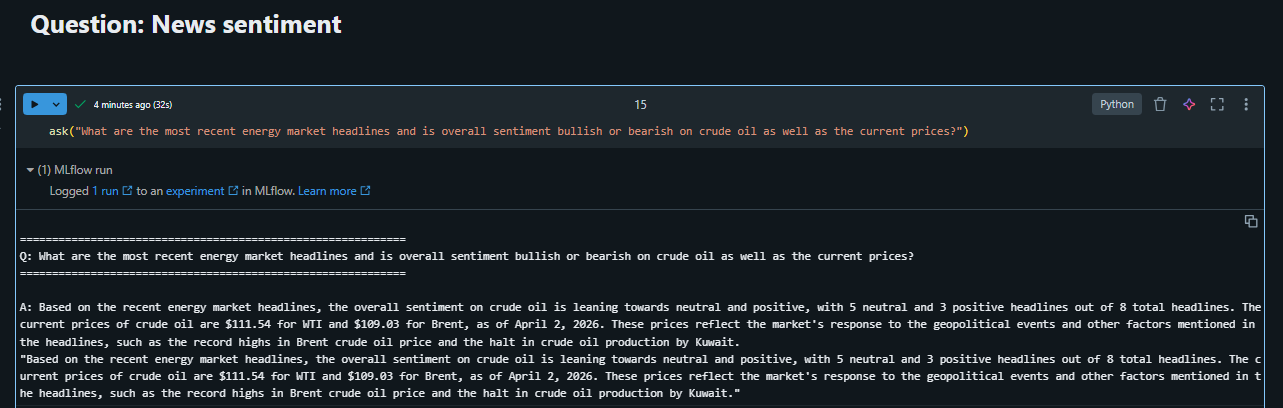
Question: “What are the most recent energy market headlines and is overall sentiment bullish or bearish on crude oil, as well as the current prices?”
Agent response:
Based on the recent energy market headlines, the overall sentiment on crude oil is leaning towards neutral and positive, with 5 neutral and 3 positive headlines out of 8 total headlines. The current prices of crude oil are $111.54 for WTI and $109.03 for Brent, as of April 2, 2026. These prices reflect the market’s response to the geopolitical events and other factors mentioned in the headlines, such as the record highs in Brent crude oil price and the halt in crude oil production by Kuwait.
Sentiment from news articles should probably be treated as directional, not predictive.
This is the agent firing both tools, query_market_data for current prices (now correctly hitting silver_commodity_ohlcv via the certified SQL example) and query_news_sentiment for headlines and scores. Before the Genie tuning, this same question returned a stale March price and a single line counting news categories. After tuning, it returns a grounded, multi-signal market view.
Here is what the MlFlow trace looks like as well:
Genie Tuning Principles
- Start with instructions for JOIN and output format issues. They’re easy to write and usually fix Genie picking the wrong path when the correct answer requires combining two tables.
- Use certified SQL examples for table selection issues. When Genie consistently chooses the wrong table despite instructions,
example_question_sqlsis the reliable fix. It bypasses Genie’s SQL generation entirely for known question patterns. - Clarify column semantics. Series codes like
WCRSTUS1are opaque. Spelling out what they mean (crude stocks, production, imports) helps Genie pick the right series. - Write instructions that address known failure modes directly. “Never return counts when the user asks about specific events” is more actionable than “be detailed”.
This investment in Genie quality pays compounding dividends. Every query that flows through the agent benefits, whether it comes from a user in the Genie UI, from the LangGraph agent, or from a scheduled notebook. Time spent tuning the sub-agents is time saved debugging the orchestration layer.
What Makes This Pattern Powerful
A few things stand out about this approach compared to alternatives:
Genie as a sub-agent is genuinely useful. Genie handles all the SQL complexity, schema understanding, joins, aggregations, formatting. The LangGraph agent just needs to ask it a question in plain English and get back a structured result. You get the flexibility of natural language querying without exposing raw database access to the agent.
Scoped Genie spaces dramatically improve accuracy. I have found a single Genie covering all tables writes worse SQL on domain-specific questions because the schema is too broad. Three tightly-scoped Genie spaces write better SQL on their respective domains, and the agent router compensates for the added complexity.
Tool descriptions drive routing quality. The LLM’s routing decisions are entirely based on the tool docstrings. Writing precise, example-rich descriptions, what the tool covers, what it doesn’t, when to use it, is the highest-leverage thing you can do to improve agent behaviour. No fine-tuning required.
MLflow Tracing makes debugging tractable. Without tracing, a wrong or incomplete answer is hard to diagnose. Was it the routing? The Genie SQL? The LLM synthesis? With traces, you can see exactly where things went wrong.
What’s Next
This was a lot of fun to build and I think as I continue bringing this data into the lakehouse there will continue to be interesting analytical and AI opportunities.
A few natural extensions from here:
- Databricks App: wrap the endpoint in a Streamlit chat UI so the agent is accessible to non-technical users without an API client
- Memory: use Lakebase to persist conversation history and user preferences across sessions, enabling multi-session research threads
- Evaluation: use MLflow’s
genai.evaluate()to score routing accuracy and answer quality against a golden set of questions
Thanks for reading 😀!