
The Pain of Managing Data Lakes
Managing data lakes, especially before modern tooling, was a painful, time-consuming undertaking. There are many aspects to managing data lakes, but I wanted to focus this blog on the data security aspect.
Data security is the bane of my existence and is a consistent issue with ETL workloads as you are effectively copying data from a source system with its own access control into another system, probably Azure Data Lake Storage (ADLS), that has its own set of permissions and access controls. I have never seen security control mapping from source systems to data lakes done well. Most organizations unintentionally expose data far more broadly than they should.
I have worked in a few industries, each with varying degrees of security requirements. I have worked in airlines where we dealt with passenger records and PII information that needed special care from a security standpoint. I, however, have spent most of my time in energy and oil & gas and I have found that keeping data security as simple as possible helps keep work moving quickly.
At Plains, we follow an ‘open by default and closed by exception’ policy where each data set that is landed in our lake is by default ‘open’ to all, and we restrict access to data sets that are identified as sensitive on ingestion. If you work in a more sensitive industry like banking, that may not be a reality for you.
In this blog, I wanted to share a few stories and experiences I have had over the years securing data lakes and the pain of doing it.
As I was thinking about these previous experiences, I also want to talk about the amazing benefits Unity Catalog provides and how it could have saved me a lot of pain 5-6 years ago.
The Days of Data Lake Gen1
My first couple of years in the data space were purely focused on DevOps and integrations. Basically, making the release process for the data engineers more efficient and integrating all the many services we used.
It has been a while, but I believe we had an architecture like this:
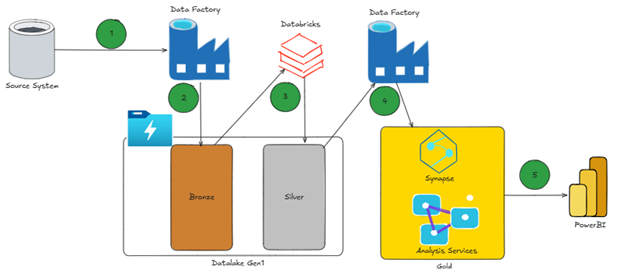
I have annotated the above diagram with numbers to explain how the data moves between these services:
- ADF leveraging the integration runtime pulls data from on-premises systems
- Data is dropped into bronze as parquet
- Databricks picks up the data from bronze and converts it into delta parquet moving into silver
- ADF picks up the data from silver and puts it into ‘gold’ which is either analysis services or Synapse depending on the use case
- Fact/dimension tables loaded from gold zone or Synapse
- Analysis services built the semantic model used by Power BI
- Power BI for reporting
As mentioned earlier, my sole job at the time was purely to manage integrations and the DevOps processes that supported the release of artifacts into production.
The industry has made leaps and bounds in progress to simplify this process but at the time this was incredibly complicated. There was no unified CI/CD pipeline across services, ADF’s JSON ARM templates were painful, AAS DevOps was extremely manual and the identity and access model were incredibly siloed across these services.
Each of these challenges could have individual blogs written about them, so to keep this blog focused, I want to move on to talking about the complexities around managing security in data lakes.
The above architecture references Data Lake Gen1, which I believe has been marked as out of support by Microsoft, but even Data Lake Gen2, I would argue, has the same technical challenges I am about to lay out.
The Pain of Managing Data Lake Security
If I knew what I know now back in 2019, I would have saved Conner back then a lot of pain. Now I want to talk about how managing data lake permissions back then was difficult and set up the blog to talk about how Unity Catalog addressed many of these challenges. Let’s start by talking about how POSIX-style permissions are limiting.
POSIX ACL Limitations
An Access Control List (ACL) is a list of permissions attached to an object (such as a file or folder) that specifies which users or groups can access the object and what operations they can perform.
This is a huge oversimplification of the technology, but Azure Data Lake Storage Gen1 and Gen2 implement a hierarchical file system with POSIX-style permissions and ACLs, similar to those found in Linux file systems. This means access control is primarily managed through three permission types: Read, Write, and Execute.
- Read (r):
- For files: Allows viewing of the file’s contents.
- For directories: Allows listing the contents of the directory (e.g., using
ls).
- Write (w):
- For files: Allows modifying or deleting the file.
- For directories: Allows creating, deleting, or renaming files within the directory.
- Execute (x):
- For files: Allows running the file as a program or script.
- For directories: Allows entering or accessing subdirectories within the directory.
Note: Given the amount of permissions Unity Catalog exposes, it becomes very clear that RWX permissions are incredibly limited.
ACL Inheritance Wasn’t Reliable
There were lots of issues around setting permissions as well if you were not mindful in setting them up prior to ingesting data.
Let me explain this in an example, imagine you are streaming data in from a source. In my case, when I was helping maintain these services, we were bringing in PNRs and DCS data (passenger records and departure control records) from a large airline.
If you imagine all the flights taking off and landing, there was a high volume of data coming in. The integration pattern looked something like the below. We had an application publish messages to an event hub, and we had Databricks read from the event hub queues and drop the messages into parquet format in our data lake.
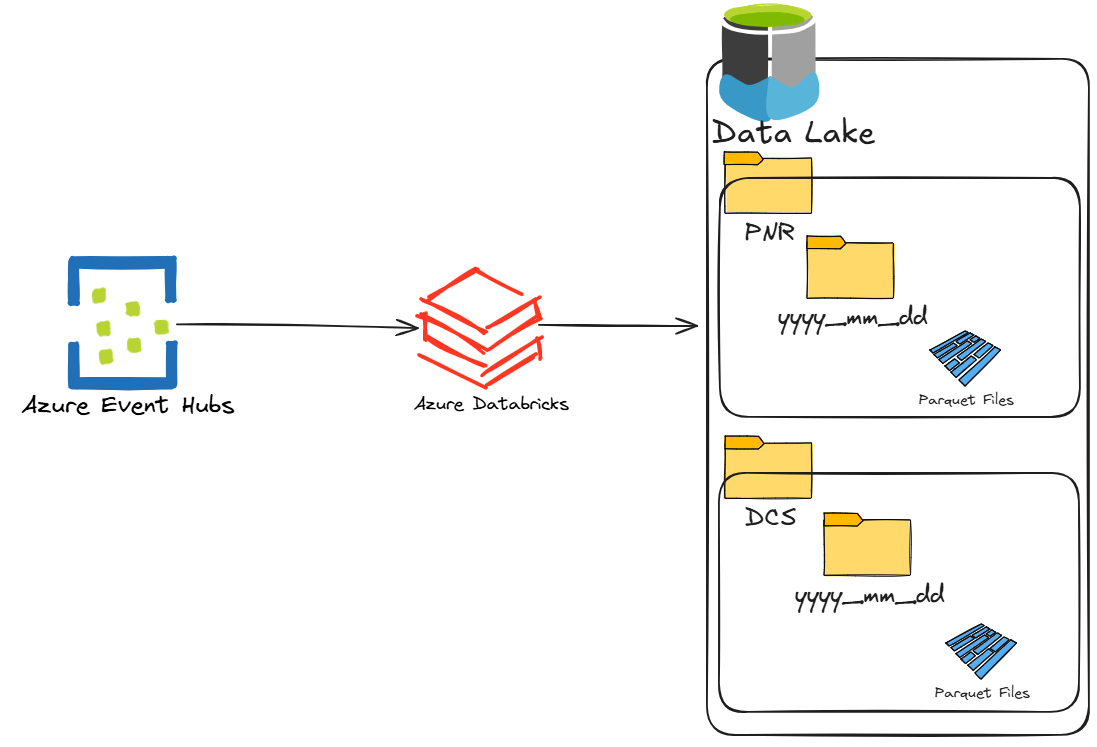
It was exciting to see this data flowing into our lake after all the hard work building ARM templates and making sure everything was integrated nicely. However, I remember my excitement quickly dwindled when one of the data engineers came by and asked ‘Hey, can I get access to the PNR data please’?
I remember clicking through the UI in the Azure Portal and attempting to add permissions, but I made one bad assumption. I assumed there would be a way to recursively set the POSIX permissions on the PNR folder. Basically, I needed to set permissions on every single object (file and folder) within the PNR folder. Otherwise, the data engineer requesting this could get access denied reading a parquet file buried in a child folder somewhere.
You cannot recursively set permissions in the portal and you need to write some code to do this.
In our case, we wrote a .NET application to apply new users to these folders. Since the streaming data had been coming in for a few weeks, the number of files and folders in the PNR folder grew into the hundreds of thousands.
Running a script made this easier, but it was prone to failure due to network or timeout issues. For example, the script could get a good portion done assigning the permissions and it would fail, meaning some of the folders would not get the right permissions set. Data engineers would often report unauthorized error messages when trying to read those parquet files. Since the script had no form of state and could not pick up where it left off, we had no choice but to rerun the script from the beginning and continue running it until the data engineer no longer received that error.
As time went on, our code evolved to include things like ‘state/checkpointing’ so we could rerun the script from where it left off, but it really felt like we were building some pretty intricate software and it was just another thing to add to the long list of things we had to maintain.
ACL Limits
Another oversight we did not realize at the time was that there were hard limits as to how many ACLs you can set on a file or folder. The maximum number of access ACLs per file or folder is 32. This means only 32 objects can have access to a file/folder at a time. Our script was assigning individual users access to these folders 🤦♂️, which did not scale and we hit that limit very quickly. The obvious solution here (hindsight is always 20/20) was to assign Microsoft Entra ID groups access to the data lake objects. This was going to require our .NET software to become more sophisticated, creating groups and assigning them on demand.
The ‘Solution’
Full disclosure, all of this happened a number of years ago, so I am a bit fuzzy on the details.
After all that pain, we learned some important lessons and were ready to revise our approach. We spent a bunch of time sitting with vendors and updating our .NET code to roll out a new strategy for managing security in our Data Lake. The cleanup of existing permissions is a whole other story, but we basically had to write more code to recursively remove all existing permissions and apply the new security pattern, while taking into account the disruption this would cause. It was a gong show!
The Model That “Finally Worked”… for a While
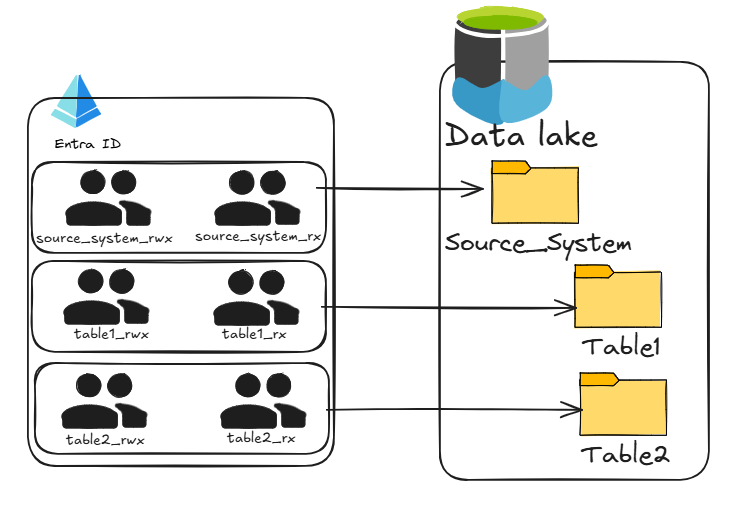
The model we settled on was straightforward. Every source system got a Microsoft Entra ID group for readers and another for writers, and we applied those groups directly to the parent folder in Azure Data Lake Storage Gen2 before any data landed. Because Azure Data Lake Storage uses inherited POSIX-style ACLs, anything that arrived beneath automatically picked up the same permissions. For the more complex relational systems, we expanded this pattern so we could secure both at the source level and at the individual table level. It still didn’t give us anything close to column-level or row-level access control, but compared to where we started, it was a massive improvement.
This setup actually worked well for a while. We weren’t constantly hunting down folders that lost inheritance or ACL entries that exceeded the 32-item limit. Permissions became something we only had to think about once during source onboarding. Users were simply added to the appropriate Entra ID groups and everything just flowed from there. For a moment, it felt like we had finally tamed the complexity of data lake security.
Then we were blindsided by something we didn’t expect at all: Azure authentication itself.
How Azure Authentication Works
This is where understanding how Azure handles authentication becomes important. When a user or service accesses something like Azure Data Lake Storage, Azure issues a JSON Web Token, or JWT. It’s just a small, signed package of information that gets passed along with each request. Inside that token is all the context Azure needs to authorize the user, who they are, which tenant they belong to, and, most importantly for us, which security groups they’re in. Azure Data Lake Storage checks the object IDs of those groups against the ACLs on the folders and files and decides whether the request should be allowed.
A simplified JWT looks like this:
{
  "upn": "user@company.com",
  "oid": "1234-5678",
  "groups": [
    "guid1",
    "guid2",
    "guid3",
    ...
  ]
}
These group GUIDs are how Azure Data Lake Storage (and anything using POSIX ACLs) decides whether a user has read/write access to a file or folder.
The challenge is large enterprises have employees who belong to hundreds or even thousands of Microsoft Entra ID groups.
However, JWTs have size limits. When the group list becomes too large, Azure cannot fit them all into the token. So Azure switches to what’s called the “overage claim” mode.
Instead of including the group list, the token contains:
"_claim_names": { "groups": "src1" },
"_claim_sources": {
  "src1": {
    "endpoint": "https://graph.microsoft.com/v1.0/me/getMemberObjects"
  }
}
This tells the resource:
“I can’t fit the groups in the token, go query Microsoft Entra ID to figure out what groups this user actually belongs to.”
Authorization could now take hundreds of milliseconds or more since the groups were no longer embedded in the JWTs. We ended up seeing some pretty significant latencies to storage reads and writes.
Long story short, we had to engage several engineers across different product groups at Microsoft to try to get this resolved.
I believe a hotfix had to be released from one of the product groups to address this issue, but that was after weeks of sending/analyzing logs and lots of meetings.
Enter Unity Catalog
After years of wrestling with the limitations of POSIX ACLs, recursive permission headaches, and Azure authentication quirks, Unity Catalog came along and seriously simplified data lake security. Unity Catalog centralizes data governance, enabling fine-grained access controls and simplified permission management, all natively integrated with Databricks. This modern approach addresses many of the pain points from legacy architectures, making it far easier to secure sensitive data, manage user access, and ensure compliance across the organization. Unity Catalog basically proxies access to your data lake:
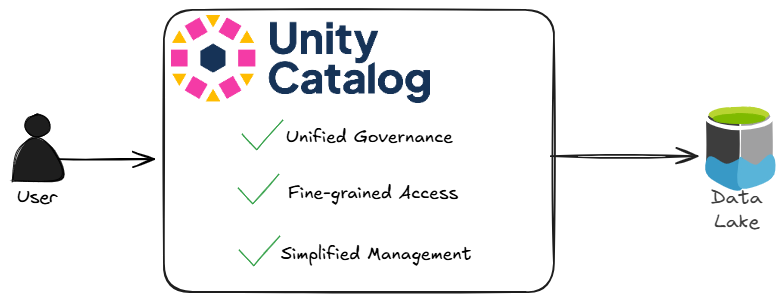
With Unity Catalog, organizations gain the ability to define access policies at the table, row, and column levels, which extends far beyond the limitations of traditional RWX permissions. Permissions can be managed through a unified interface, making onboarding simpler and reducing the risk of misconfiguration. Additionally, Unity Catalog enables auditing of data access and changes, supporting compliance and security investigations. Integration with existing identity providers ensures seamless management of users and groups. Here is a side by side comparison of POSIX style permissions and Unity Catalog:
| Feature | POSIX ACL (ADLS Gen1/Gen2) | Unity Catalog (Databricks) |
|---|---|---|
| Permission Model | RWX (Read, Write, Execute) | Fine-grained privileges (SELECT, MODIFY, CREATE, etc.) |
| Scope of Control | File and folder level | Table, row, and column level |
| Inheritance | Hierarchical, but prone to issues | Managed centrally with consistent propagation |
| Identity Integration | Microsoft Entra ID groups and users | Integrated with identity providers (Entra ID, etc.) |
| Scalability | Limited (max 32 ACL entries per object) | Highly scalable with role-based access control |
| Auditing & Governance | Minimal, manual logging | Built-in auditing and compliance reporting |
| Management Interface | Azure Portal or custom scripts | Unified UI and APIs within Databricks |
| Advanced Security Features | No row/column-level security | Supports row-level and column-level security |
| Automation & CI/CD | Manual or custom scripts | Native integration with Databricks workflows |
With Unity Catalog, so many folks will be able to avoid the grief of managing ACLs in data lakes.
Conclusion
Managing data lakes has historically been a complex and error-prone process, fraught with technical limitations and operational headaches. 2019 Conner really wishes he had Unity Catalog 😂 Unity Catalog represents a significant leap forward, offering centralized, fine-grained, and auditable data governance that simplifies security management and helps organizations meet their compliance goals. By adopting modern tools like Unity Catalog, teams can spend less time fighting with permissions and more time unlocking the value of their data.
Thanks for reading! 😀